




GarageSale
Make your business on eBay. On a Mac.
Comfortably create, launch and track your listings. Manage your sales and inventory. Simplify your eBay life and use the most advanced eBay seller tool for Mac.
Live ListingsNumber of active eBay listings created with GarageSale

Download NowTry it Free
New in Version 9
Version 9.9.5 for
macOS
- Frequently Asked Questions
- GarageSale Pro FAQ
- eBay Errors Explained
- Video Tutorials
- Lost your License?
- Online Manual
- User Forum
- Contact Support via Mail
Frequently Asked Questions
- General:
-
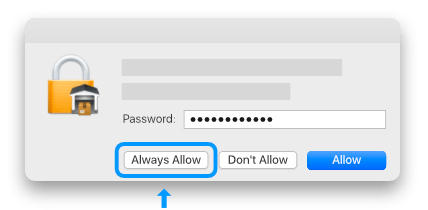 When you get this system prompt you just need to enter your macOS user password and then click the "Always Allow" button. Please note that you probably get multiple prompts which can be irritating but is totally normal.
You need to grant GarageSale access to each eBay token (and Pro account) which are securely stored in your Mac's keychain.
- Why do I have to fetch a token at the eBay site?GarageSale is a certified eBay client. The only way for certified clients to add listings for your eBay account is via an access token. On the page you are granting GarageSale this eBay token.
- Do I have to give you access to my eBay account?No. You don't give us access to your account at all! eBays authorization page is a little bit misleading on that. When you agree to the eBay page, you give GarageSale access to your eBay account in form of an access token. This access token is securely stored in your system Keychain and not shared with anybody, including us.
-
What information will GarageSale share with you?GarageSale will not share any kind of information about your eBay listings or eBay activities with us.
See the Privacy Policy for more info. -
Does GarageSale make use of "Active content" or "non-secure HTTP content"?GarageSale is compatible with eBay's listing policy updates. It does not make use of active content, it does not insert non-secure HTTP content and the listing designs are mobile-friendly. If not done already, update to the latest GarageSale version.
Active Content:
Due to eBay rules, "active content" (e.g. JavaScript, Plug-ins or Flash, iFrame and Form actions) will no longer display in your eBay listings starting in June 2017. Please find all important details on this eBay website: Replacing Active Content.
GarageSale's listing designs don't make use of "active content". However, if you've added videos to your listings (e.g. from YouTube or Vimeo) they won't work any longer.
You also might want to check if you've added custom code to your listings containing Flash or Javascript, e.g. cross promotion galleries. Contact the creators if you're unsure.
Links:
Links are only allowed if they conform to eBay's link policy. Don't insert links to non-eBay website (YouTube is allowed). Links to your eBay store or your other eBay pages are fine.
HTTP Content:
eBay requires all images that are embedded in the listing description to use the secure HTTPS protocol instead of non-secure HTTP protocol, e.g. images that use a "http://" URL.
GarageSale 7 and 8 embed images via HTTPS if eBay's picture service or GarageSale's free image service is selected in the GarageSale preferences. -
How to make my listings ready for eBay's new policies (https, links, active content)?
Overview
Due to new eBay policies links to non-eBay websites, including links to images, are no longer allowed. Links are only allowed if they conform to eBay's link policy, e.g. you can still link to your eBay store, other eBay pages or to a YouTube video.
Also, eBay requires all resources (e.g. images) that are embedded in the listing description to use the secure HTTPS protocol instead of non-secure HTTP protocol, e.g. images that use a "http://" URL.
"Active content" is forbidden in eBay listings (JavaScript, Plug-ins or Flash, iFrame and Form actions, embedded YouTube videos).
It might be needed to revise listings started with earlier versions of GarageSale to make them eBay compliant.
Making your listings ready for eBay's new policies
The default "Made with GarageSale" footer, the design templates and image links in GarageSale 7.0.9 and higher have been updated and are compliant to all eBay policies. If not done already, please also see our blog post here: GarageSale 7.0.9 supports eBay's new Link Policy.
This is what you should do to update your affected listings:
- Please update to the latest version of GarageSale.
- If you're using a design from the Design Store, please update it as well: Select "Show Design Templates" (Window menu), then click on the download button (arrow icon) in the toolbar.
- To make sure there're no additional links or http content in your item description you can use the "Repair Image Links" command from the "Listing" menu. This command is especially useful if you imported listings from "My eBay", which contain image links and http image URLs in the description.
Please note:
The "Repair Image Links" command only has effect on http image links you manually inserted into your listing description! Image links added to your description automatically by GarageSale get fixed automatically when invoking the "Revise" command! - Restore the default GarageSale footer:
GarageSale 7: In the GarageSale preferences > General click on "Edit", then click on "Restore Default" and "OK".
GarageSale 8/9: In the GarageSale preferences > General select one of the default footer designs or select "Custom" to edit your own footer. - This is the most important step: Invoke the revise command from the toolbar to upload the updated listings. In the revise panel you can choose "Revise entire listing". If needed, you can revise multiple listings at once. Once revised from within GarageSale all the listings should be compliant to eBay's new policies.
Bulk-Revising multiple active listing
You maybe need to only revise a few listings but if you want to revise multiple listing at once it might be helpful to create a smart group that contains all your active listings. Create a new smart group and use these rules:
- State > is > Running with bids or sales
- State > is > Running without bids or sales
Good to know
- GarageSale is compatible with eBay's listing policies. It does not make use of active content, it does not insert non-secure HTTP content or prohibited links and the listing designs are mobile-friendly.
- If you are using your own image server with GarageSale via FTP or webDAV, please make sure that your server is supporting HTTPS requests for your images resources. If your server already supports HTTPS requests, makes sure the the "Download URL" field in GarageSale's configuration for your server starts with "https://" instead of "http://", so you are compliant with the new eBay rules.
- GarageSale's listing designs don't make use of "active content". However, if you've added video (e.g. from YouTube or Vimeo) to your description you might want to remove it.
- Make sure you don't have inserted own HTTP image URLs in your item description, footer, info boxes etc. HTTP-URLs start with "http://", like this: http://www.domain.com/images/image.jpg
If supported by your server you can simply change the URLs to "https://". - If you're using your own custom listing design, please make sure it's compliant to the eBay policies.
- Usage:
- Does GarageSale support fixed-price items?Yes, of course. To list fixed-price items simply select the “Buy it Now” checkbox and deselect the “Starting Bid” checkbox.
- Does GarageSale support eBay Stores?Yes, GarageSale fully supports eBay stores. More Info
-
What eBay sites does GarageSale support?So far GarageSale supports 20 different eBay Sites, like eBay USA, eBay Canada, eBay Motors, eBay Germany and eBay UK. You can choose the eBay Site in the “Advanced” section of the Inspector sidebar in GarageSale.
See the full list of all available eBay sites at the bottom of this website. - How do I offer free shipping in my listings?Simply enter “0.0” in the shipping cost field. eBay converts this to free shipping.
- How can I list to eBay Motors?The eBay Motors site is a different site, like for instance eBay Germany and eBay UK. To list cars or car parts on eBay Motors you have to set the eBay site for your listing to "eBay Motors". You can do this in "Advanced" Inspector tab.
- Where in the GarageSale preferences can I select GarageSale's free image service?Please open the GarageSale preferences > eBay > eBay Images and select GarageSale's free image service, EPS or your own image server there.
-
Some categories are missing in the category browser or seem to be out-dated?
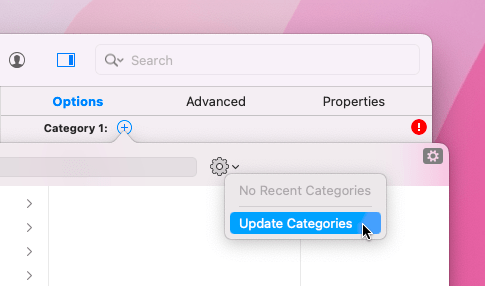 The eBay category data probably just needs to be updated manually:
1. Open the GarageSale preferences > Accounts and click on "Refresh Access Token".
2. If done, select one of the listings in question and open the category browser. In that browser click on the sprocket icon to update the category data. -
In Preview mode it just states "Generating Preview..."?Please open the GarageSale preferences > Accounts and refresh the eBay access token for your default eBay account. A valid token is also required by GarageSale to download the latest category data from eBay.
If this won't help, please check the answer below. -
In Launch Control the "Start" button is greyed-out and no listing fees are shown?If you recently upgraded GarageSale it might be required to renew the eBay token completely:
Remove your eBay account from the GarageSale preferences > Accounts, restart your Mac and then re-add your eBay account afterwards.
If this won't help, it's probably an issue with your eBay token saved in the system Keychain. Please give this a try to fix it:- Quit GarageSale if running.
- Open the macOS "Keychain Access" application and enter "GarageSale eBay Account" in the search field. (If you don't find anything try it with "ebay token".)
- Right-click on the eBay account token in the Keychain and select "Delete".
- If done, restart your Mac, start GarageSale and add/refresh your eBay access tokens in the GarageSale preferences > Accounts.
-
“Keychain Error: There was an error reading your eBay account from your Mac's Keychain.”It might be required to renew the eBay token completely:
Remove your eBay account from the GarageSale preferences > Accounts, restart your Mac and then re-add your eBay account.
If this won't help, please give this a try:- Quit GarageSale if running.
- Open the macOS "Keychain Access" application and enter "GarageSale eBay Account" in the search field. (If you don't find anything try it with "ebay token".)
- Right-click on the eBay account token in the Keychain and select "Delete".
- If done, restart your Mac, start GarageSale and add/refresh your eBay access tokens in the GarageSale preferences > Accounts.
-
I incorrectly get a “Maximum Listing Count Reached” message when trying to start a listingOften it already helps to restart your Mac and router.
If this won't help, it might be required to renew the eBay token completely:
Remove your eBay account from the GarageSale preferences > Accounts, restart your Mac and then re-add your eBay account. -
Does GarageSale support ebay's "Managed Payments" option?Yes, uploaded listing will use ebay's "Managed Payments" option automatically. There's no specific option for eBay's payment method that you'd need to select.
Only on some few eBay sites it's still required to select *any* payment method to proceed with the listing start process: Ignore the upcoming warning (with a yellow exclamation mark) regarding payment options and continue starting your listing.
Hint: You can tell GarageSale to ignore warnings with a yellow exclamation mark by right-clicking on the message and selecting "Ignore Future Warning". - Upgrading:
-
How do I upgrade to GarageSale 9?Simply use the built-in update mechanism from the "GarageSale" menu in GarageSale or just download version 9 from the Downloads page.
See the Upgrading from a previous version section for more details. -
How do I get an upgrade license for GarageSale 9?If you already own a license for an older GarageSale version, please open GarageSale 9 and choose “Buy License...” from the “GarageSale” menu. The upgrade option should be available there. If not, click on the "Enter previous license" link.
If you subscribe to GarageSale Pro straight ahead you don't need to purchase an upgrade license. - What happens with my existing GarageSale database if I upgrade to GarageSale 9?Installing and using GarageSale 9 will not effect your ability to use the previous GarageSale version. Your current database will be migrated to the new database format of GarageSale 9 but the original database file will not be altered in this process.
- Am I eligible for a free GarageSale 9 upgrade license?If you purchased a license for a previous version after August 1st, 2021, GarageSale will offer you a free license once you start the purchase flow within the application (choose “Buy License...” from the “GarageSale” menu).
- GarageSale Pro:
-
What is "GarageSale Pro"?GarageSale Pro is a subscription service, ideal for sellers with a high sales volume and everyone who wants to be able to sync their GarageSale data between different Macs.
- Start unlimited listings each month (the 50 listings/month limit gets removed)
- Enable GarageSale's Synching feature. The synching feature allows you to keep your items synched accross your Macs. Please see the Synching chapter in the manual for all details.
- Get all upgrades for free
- Use GarageSale's image service even for your GTC listings (the previously paid "GTC image option" is included in GarageSale Pro)
- Instead of 30 images per listing GarageSale's image service supports up to 50 images per listing
- The Auto-Cancel option for GTC listings can be used
- How can I get "GarageSale Pro"?The easiest way is to open the "GarageSale Pro" tab in the GarageSale preferences. There you need to create a GarageSale Pro account first. Once you're signed-in with your Pro account, you can subscribe to GarageSale Pro or redeem your coupon code, if you have one.
- How do I enable the synching feature?Once you've subscribed to GarageSale Pro and created an account you can enable the synching feature in the GarageSale preferences > GarageSale Pro. Please see the Synching chapter in the manual for all details.
- How do I activate my GarageSale Pro subscription on my other Mac?To activate your Pro subscription on your other Macs, simply sign-in with your Pro account there. This can be done e.g. in the GarageSale preferences > Pro. The system will recognize your active subscription automatically after signing-in.
- How do I cancel my GarageSale Pro subscription?You can cancel your GarageSale Pro subscription in the GarageSale preferences > GarageSale Pro. If you're signed-in with your Pro account there's a "Cancel Subscription" button on the left.
-
Coupon Code: How do I get one and how can I redeem it?If you purchase a full license through GarageSale for the first time, you receive an additional mail with your personal coupon code for GarageSale Pro. This coupon code allows you to test the GarageSale Pro service for two months for free.
This is how to redeem the code:- Open the GarageSale preferences > Pro
- Click on "Create Pro Account" if you haven't created one yet.
- Make sure to be signed-in with your Pro account email and password.
- If you have a valid coupon code click on "Redeem Coupon". If you don't have a coupon you can subscribe immediately, of course.
- Make sure that your GarageSale 9 license has already been entered. You can check it in the "About GarageSale" panel in the "GarageSale" menu.
- You must be signed-in with your Pro account in the GarageSale preferences > Pro.
- You can only redeem your coupon code if you haven't subscribed yet. You can't redeem your coupon code AFTER subscribing.
- Advanced:
-
Where is my GarageSale 9 database located?Your GarageSale 9 database folder is located inside the "Containers" folder in your Home directory:

- The easiest way to locate the GarageSale 9 database folder is to paste the following command in the "Terminal" application:
open -R ~/Library/Containers/com.iwascoding.garagesale9
- Once entered in Terminal confirm the command by hitting enter on your keyboard.
Another way to locate the GarageSale 9 database folder is to simply browse to it in the Finder. This is the full path:
Macintosh HD > Users > YourName > Library > Containers > GarageSale
Please note that you might not see the "Library" folder in your Home folder because that Library folder is not visible by default. To make the Library folder visible you first need to do this:
1. Open a Finder window and navigate to your Home folder (Macintosh HD/Users/YourName)
2. From the Finder menu, click View > Show View Options
3. Select the "Show Library Folder" checkbox
4. The "Library" folder is visible now and you can open it
Good to know:- Don't use the search to find the GarageSale database. The search result might show wrong folders.
- Don't move or replace files or folders inside the GarageSale database.
- If you want to transfer your GarageSale database to another Mac, always move the whole GarageSale database folder.
- Don't be confused if you find multiple "GarageSale" folders at the same hierarchy inside the "Containers" folders. Only one of them is the GarageSale 9 database folder, the other ones belong to older GarageSale versions, e.g. GarageSale 7 or GarageSale 8.
To find out just right-click on each GarageSale folder and select "Information". In the Information panel expand the "Name & Extension" section to see the actual database name, e.g. "com.iwascoding.garagesale9" belongs to GarageSale 9.
-
How do I transfer my GarageSale database to another Mac?To make your GarageSale database available on another Mac, locate the database folder (see the above answer), and move the whole database folder to the corresponding location on the other Mac. Make sure GarageSale is not running on either Mac while transfering this folder.

-
How do I delete my GarageSale database?Locate the database folder in your User Library (see "Where is my GarageSale 9 database located?" above). Make sure GarageSale is not running and then put the GarageSale database folder into the trash.
If you start GarageSale the next time it will open with an empty database (or ask you to import a previous database, if it finds one).
Before deleting your GarageSale database, it's a good idea to make a backup! -
How do I re-import a previous GarageSale 7 or 8 database?
1. Export any newly created listings and inventory items you created in GarageSale 9 that you want to keep.
2. Quit GarageSale 9.
3. Locate the GarageSale 9 database folder (see "Where is my GarageSale database located?" above). Put that database folder on the Desktop as a backup for now and delete it later.
4. Start GarageSale 9. If there's a database from GarageSale 7 or GarageSale 8 available at the expected location, it will startup with a welcome screen. Click on the "Import Database" button. This will import your previous GarageSale database. The import process might take a while.
5. If done, import any items you exported in step #1. - Where can I download older versions?Click on the grey "Download Older Versions" field in the Downloads section. If in doubt, please contact our support.
- Are there any Tips and Tricks?Yes, please visit the Tips & Tricks section available in the GarageSale help. It reveals some hidden features and provides useful hints.
eBay Errors Explained
- Connection error “Unknown authorization error from eBay's OpenAPI.” There probably is an issue with your eBay access token. It should help to refresh your eBay access token(s) in the GarageSale preferences > Accounts. More Info
- "Send Text" button doesn't work on eBay login page when trying to refresh token This seems to be an issue wit eBay's login page on older macOS systems like macOS 10.12. For some users it finally worked after re-enabling/re-selecting 2-factor-authorization on the eBay website. More Info
-
Error 120 “You need to create a seller account.”Please check your account settings on eBay's website. You need to be registered as a seller and must provide ebay with a payment method for your eBay account. Sometimes eBay just wants you to update or verify your settings.
Often it's helpful to start a listing on the eBay website directly so eBay can provide you with a more helpful message and guide you to the required settings. -
Error 240 “The item cannot be listed or modified. The title and/or description may contain improper words, or the listing or seller may be in violation of eBay policy.”You're using any word or code that eBay does not allow or there might an issue with your seller account.
Please find more info on the error 240 help page. - Error 932 “Authorization token is hard expired”eBay Access Tokens expire automatically after a period of time. To refresh your token, select your account in the GarageSale preferences > Accounts and click on “Refresh Access Token”.
-
Error 10007 “Internal error to the application”This is eBay's catch-all error message when they're having issues on their end. (It's not an error with the GarageSale application.) Usually this is just a temporary issue and it goes away after a while. Sometimes it helps to reboot your system and internet router. Hopefully you will then get another, working eBay server for your requests.
If you're using GarageSale 6 or older you should consider upgrading to GarageSale 7. Older GarageSale versions are not compatible with the changes of the eBay system and their image upload mechanism. - Error 21919301 “UPC / EAN is missing a value. Enter a value and try again.”You have to enter a barcode (UPC, EAN or ISBN) into the "Barcode" field in GarageSale's "Options" Inspector. If you don't have a barcode, simply leave this field empty.
-
“This selling account is enabled for payments managed by eBay. PayPal is not currently accepted as a payment method and has been removed from the listing.”You get this message because eBay is now using its own "managed payments" method, other payment options, e.g. PayPal are no longer supported. Please just ignore this eBay message and start your listing anyway. The uploaded listing will use ebay's "managed payments" automatically.
Hint: You can tell GarageSale to ignore warnings with a yellow exclamation mark in future by right-clicking on the message and selecting "Ignore Future Warning".
Lost your License?
If you have misplaced your license for one of our products, you can request it here.Just enter the email address you used for the original order. Your license(s) will be emailed to that address immediately. If you no longer have access to that email address, please contact us.
System Requirements:
macOS 11.0/Big Sur and later recommendedPricing:
US$ 14.99 (Monthly Subscription)US$ 39.99 (Single User License)
US$ 65.99 (Family License)
eBay Account Requirements:
Due to eBay policies your account must be older than 90 days and have at least 10 feedback points as a seller.Supported Marketplaces:
eBay (20 countries)
- eBay USA
- eBay Motors (USA)
- eBay Germany
- eBay UK
- eBay Australia
- eBay Italy
- eBay France
- eBay Austria
- eBay Canada
- eBay Switzerland
- eBay Ireland
- eBay Spain
- eBay Netherlands
- eBay Belgium (FR)
- eBay Belgium (NL)
- eBay Singapore
- eBay Philippines
- eBay India
- eBay Hong Kong
- eBay Poland
This is the number of all currently running eBay listings, created with GarageSale. This makes it the most popular eBay tool for Mac!See listings created with GarageSale
