



GarageSale
Make your business on eBay. On a Mac.
Comfortably create, launch and track your listings. Manage your sales and inventory. Simplify your eBay life and use the most advanced eBay seller tool for Mac.
Live ListingsNumber of active eBay listings created with GarageSale

Download NowTry it Free
New in Version 9
Version 9.7.4 for
macOS and up
Feature Overview
Feature Overview
- Listing Creator
- Tracking
- Videos
- Colored Tags
- Customizable Listing Icon Colors
- Send Discount Offers to Watchers
- Customizable Toolbar
- Script Support
- Synching
- Revise, Relist, Auto-Restart
- Import Listings from eBay
- Apply Current Changes from eBay
- Automatic Cancellation
- 150 Mobile-Friendly Designs
- Free Picture Hosting
- Image Editing
- Parts Compatibility
- CSV Import & Export
- Packing Slips and Invoices
- Inventory
- Orders
- Reports
- Account Overview
- Scheduled Starts
- eBay Stores
- Variations
- Optimized Performance
- Batch Editing
- Bulk Find and Replace
- Dark Mode
- SKU Generator
- User Properties
- Instant Error Reporting
- Take Photos with your iPhone
- iPhone Barcode Scanner
- Detachable Popover Windows
- FTP and WebDAV Image Serving
- Multi-Account Support
- Smart Groups
- Certified by eBay
- Message Templates
- Text Snippets
- Advanced Import Function
- Product Cataloque
- Photo Browser
- Active Content Compliant
Listing Creator
GarageSale's main goal is to provide you with everything that you need to create and start attractive eBay listings - with ease. To meet this goal GarageSale offers all the needed eBay options for private and for business sellers and lets you edit and style your item description and images.GarageSale helps you with complexity of the eBay system by keeping you informed about potential eBay traps and error messages. Listing on eBay is fun again!

Tracking
GarageSale tracks the state of your listings and orders. It shows all information about your listing, like current bid, watchers, sold item, listing fees and everything else.When a listing has finished you'll be informed about the buyer's name, the address and all important transaction details. The order state is synced with eBay.

Videos
Improve your listings and provide extra information for your buyers by attaching a video! GarageSale supports this new eBay feature where you first upload videos to eBay so you can then add them to your listings. An added video is automatically displayed in the image gallery of the live listing in the eBay app and the mobile browser.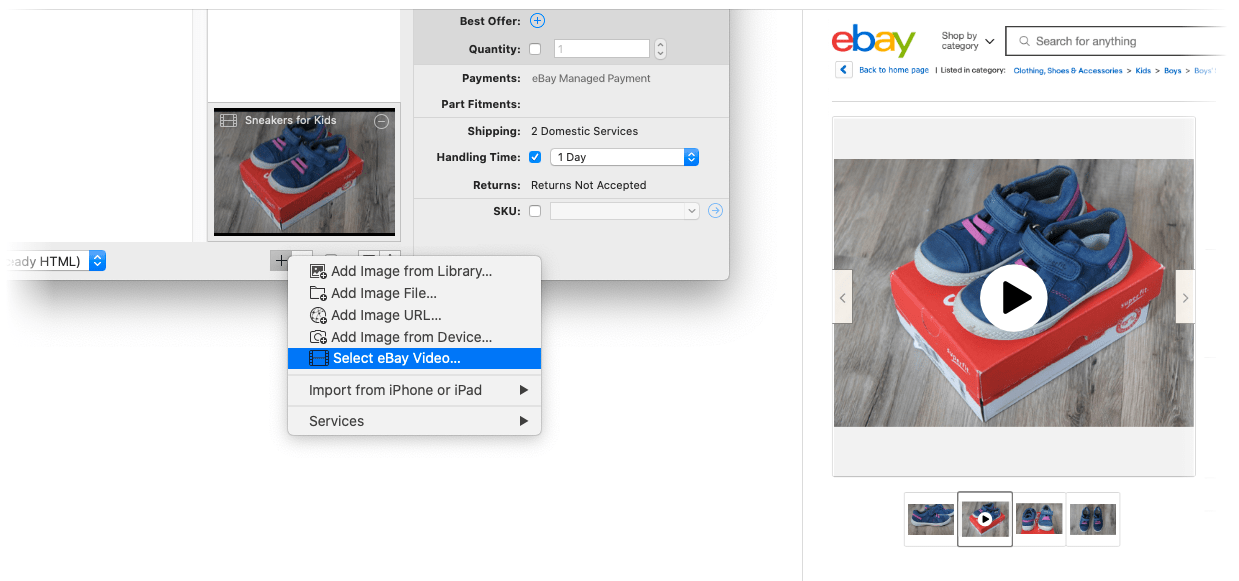
Colored Tags
Highlight specific listings and orders by assigning colored tags to them. To do this select one or multiple items, then click on the Tag button in the toolbar. Choose between 9 vivid tag colors. You can filter for these tags using smart groups.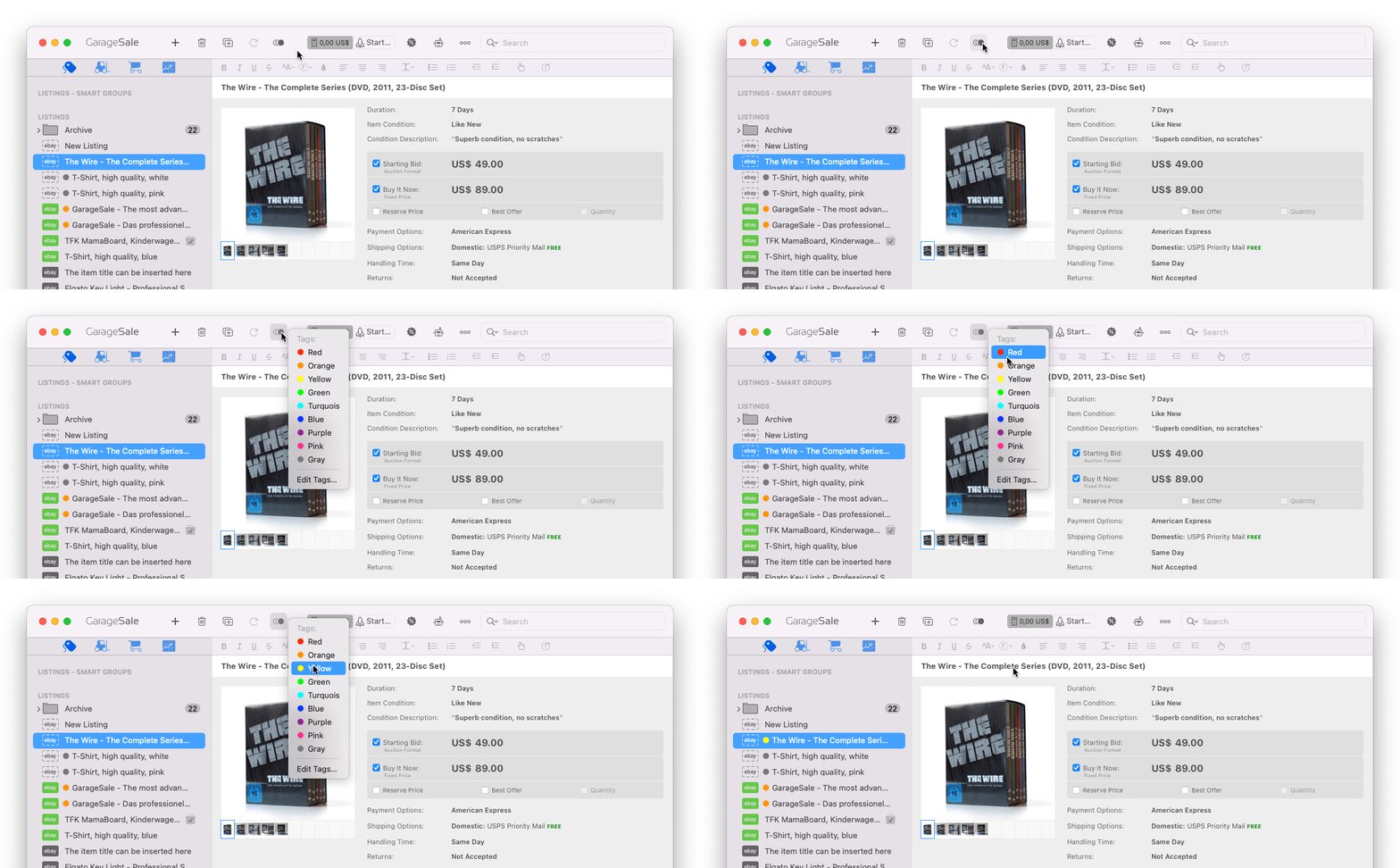
Customizable Listing Icon Colors
Listing icons in GarageSale's left outline view are fully customizable in the Preferences window. You can define a custom color for each listing state and in addition display colored title backgrounds to make different listing states even more distinguishable.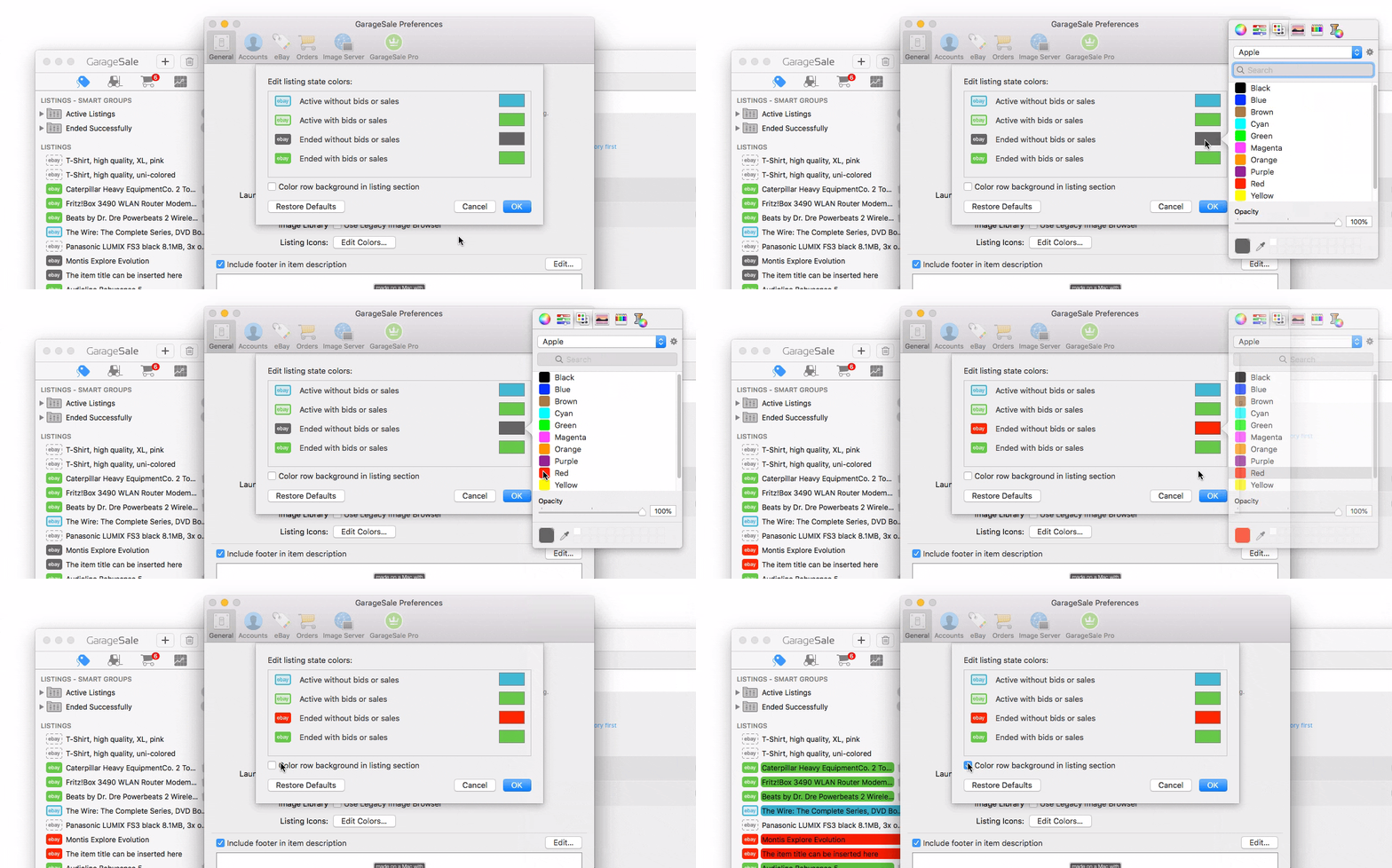
Send Discount Offers to Watchers
When watchers show interest in your product but haven't yet completed the transaction, you can target them with an offer. To do this select Send Offer to Watchers from GarageSale's Listing menu.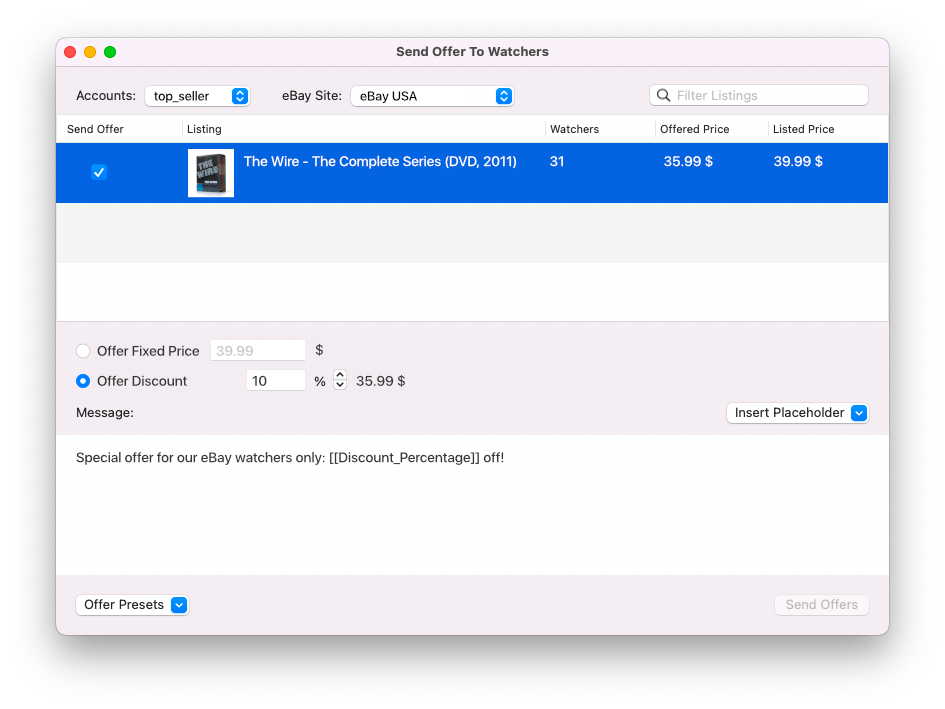
Customizable Toolbar
You can easily customize GarageSale's toolbar by right-clicking on it and selecting "Customize Toolbar". This allows you to change the position of buttons, add buttons or remove buttons you rarely use.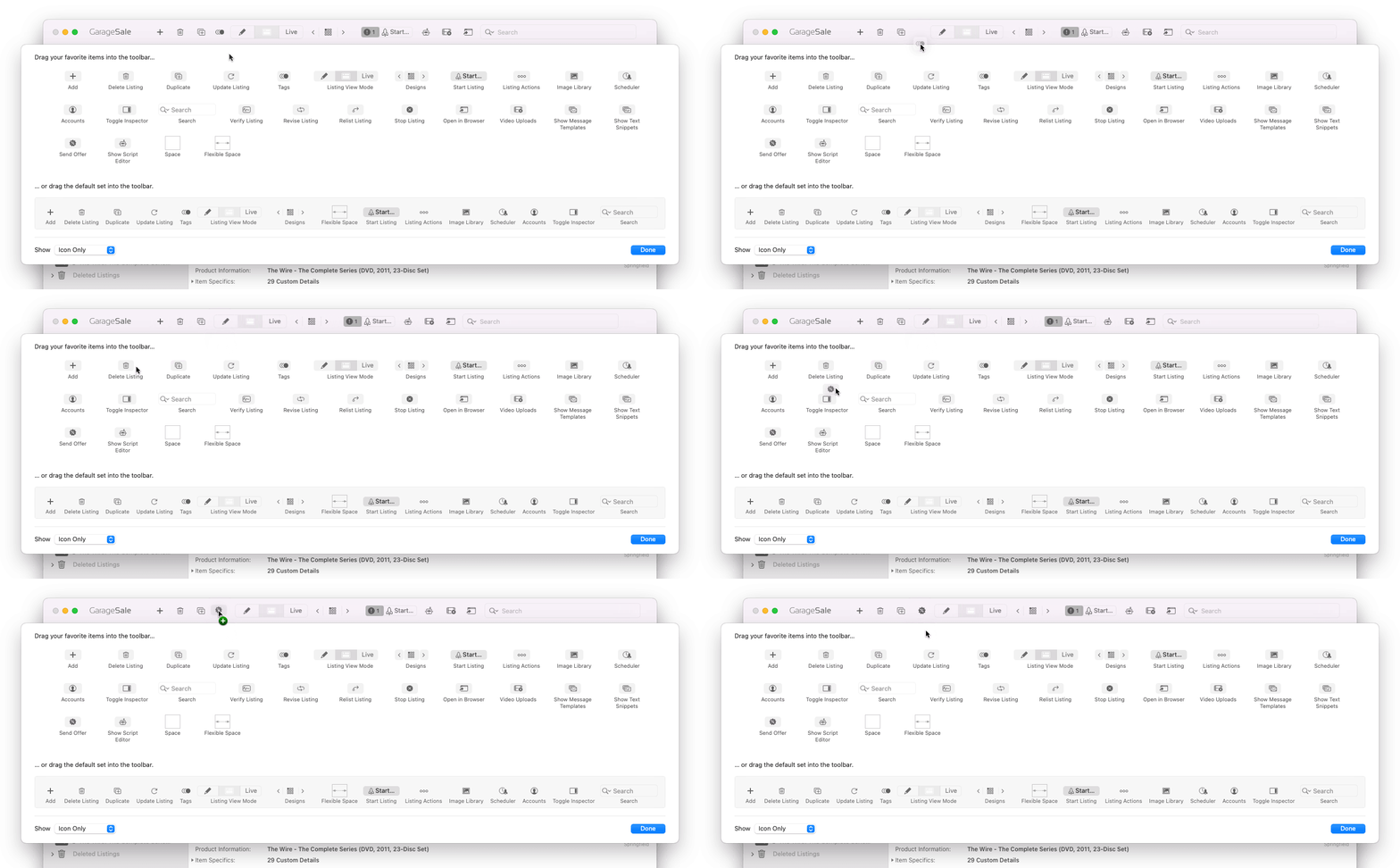
Script Support
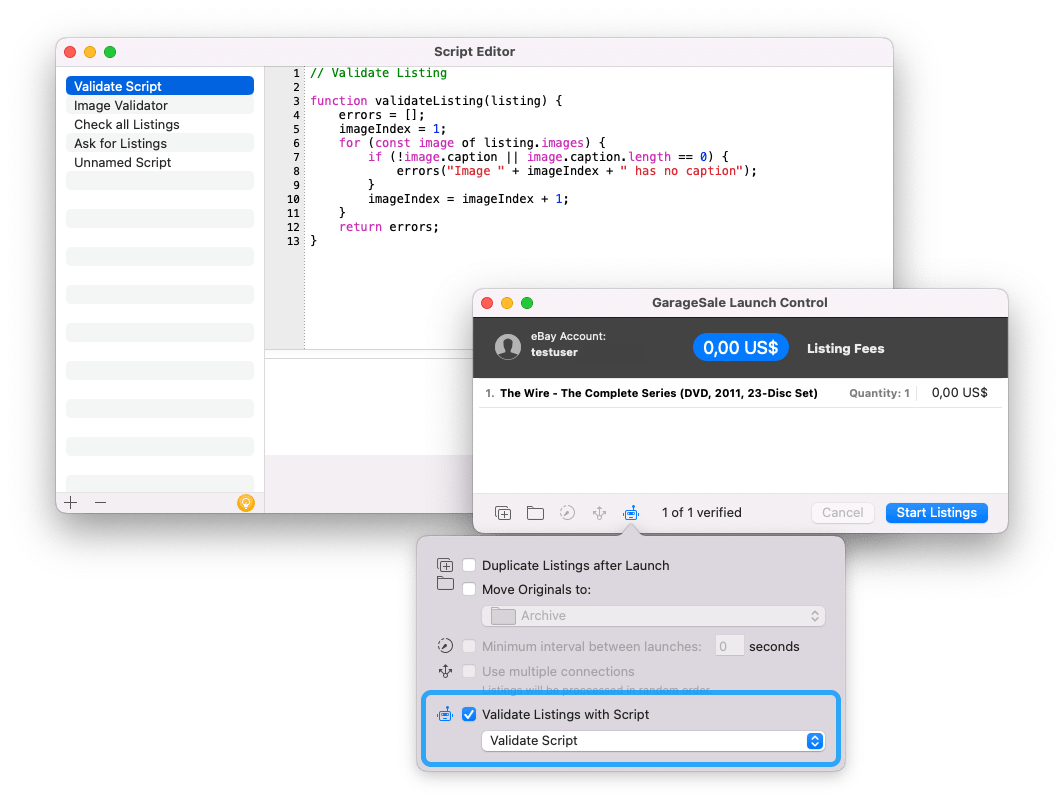
GarageSale lets you define custom JavaScript to process your listings and inventory items, e.g. to batch-edit or validate them. Since these scripts are executed within GarageSale itself, they offer far better performance than AppleScript. You can create and run scripts from the "Show Script Editor Window" command in the "Windows" menu.In addition you can can hook your own JavaScript rules into GarageSale's Launch Control window to have your listings validated before uploading them to eBay.
Synching
If you work with GarageSale on severals Macs you might find the Synching feature helpful. Once enabled your GarageSale database will be synched between your Macs. Please see the Synching chapter in the manual for all details.GarageSale Pro only

Revise, Relist, Auto-Restart
If you need to modify a listing after starting it, you can do this easily from within GarageSale.Finished listings that haven't received any bids or didn't sell can be relisted without paying listing fees twice (depending on eBay's relisting policy). GarageSale is also giving you control about what listing attributes to update. This way you can keep your recent sales score for fixed price items and retain your Best Match rank in eBay's search result.
The automatic restart feature starts new listings once your item has sold out on eBay. Using "re-list" will preserve the existing search rank of your ended listing and carry it over to the re-listed listing. This feature is linked with GarageSale's inventory management: If you have less inventory in stock than what you are offering for sale in your listing, GarageSale will not start the listing.
To revise, relist or to stop a listing open the "More" button in GarageSale's toolbar or the "Listing" menu in GarageSale's menu bar.

Import Listings from eBay
If you already have listings online at eBay, GarageSale can easily import them so you can keep working with them. Simply go to File > Import > Import From My eBay.
Apply Current Changes from eBay
You made changes on your listing outside GarageSale? No problem. Just select the active or ended listing and from the "Listing" menu choose "Apply Current Changes from eBay". This allows you to compare your local listing and the listing on eBay and apply selected changes to your local listing in GarageSale.
Automatic Cancellation
When offering items at a fixed-price, you can tell GarageSale to cancel your listings a certain period before eBay automatically renews them. Please note, that this is an internal GarageSale feature, so GarageSale needs to be running periodically to perform the cancellation.An additional icon is shown in the outline view for listings having the auto-cancel enabled. There are also new smart group rules that allow you to filter for listings having auto-cancel enabled.
GarageSale Pro only

150 Mobile-Friendly Designs
Our free listing designs offer an easy way to make your listings vastly more attractive. GarageSale comes with 150 customizable listing designs for you to choose from. With a fingertip you can fine-tune them in the "Properties" inspector and define how images and description are laid out.In addition, GarageSale offers so-called Pro Designs which let you create highly professional listings. Easily add your store name, store categories, logo and individual text boxes for shipping details, payments, returns, etc. If you run an eBay store you'll love them. 5 Pro Designs are already included in GarageSale, more are available in the built-in Design Store.
The integrated design store that lets you buy additional designs from within the application.
It offers a (still growing) variety of high-quality listing designs starting at USD/EUR 1.99. They work perfectly with your GarageSale application and come with several great layout choices. All designs can be previewed and purchased directly from within GarageSale and are automatically downloaded and installed.
You're familiar with HTML coding and want to create your own designs? With the free GarageSale Design Utility you can code new designs or modify the free designs included in GarageSale. Learn more about it in this help section

Free Picture Hosting
The quality and number of your images is crucial for the success of your listing. Store up to 30 images per listings with a size of up to 1600px on our servers. If you subscribe to GarageSale Pro you can add up to 50(!) images to your item description.Of course you can also use eBay's Picture Service (EPS) which supports up to 24 images per listing. If you want to use your own web server for image hosting you can do that, as well (FTP and WebDAV Upload).
Please note:
1. If you wish to use GarageSale's picture service for Good Till Cancelled listings (fixed-price items), a GarageSale Pro subscription is required.
2. The images are stored for 60 days on our servers. So, if you make use of GarageSale's free picture service and want to relist your listing, make sure to use GarageSale built-in relist function. If you relist through the eBay web form, there's no way for GarageSale to notice and prolong the picture life time.
GarageSale Pro: 50 images per listing

Image Editing
Easily add images to your listings and refine them directly in GarageSale. You can crop or rotate them, add forms and text, open them in an external image editor (if installed) and add image captions (if supported by the selected listing design).
Parts Compatibility
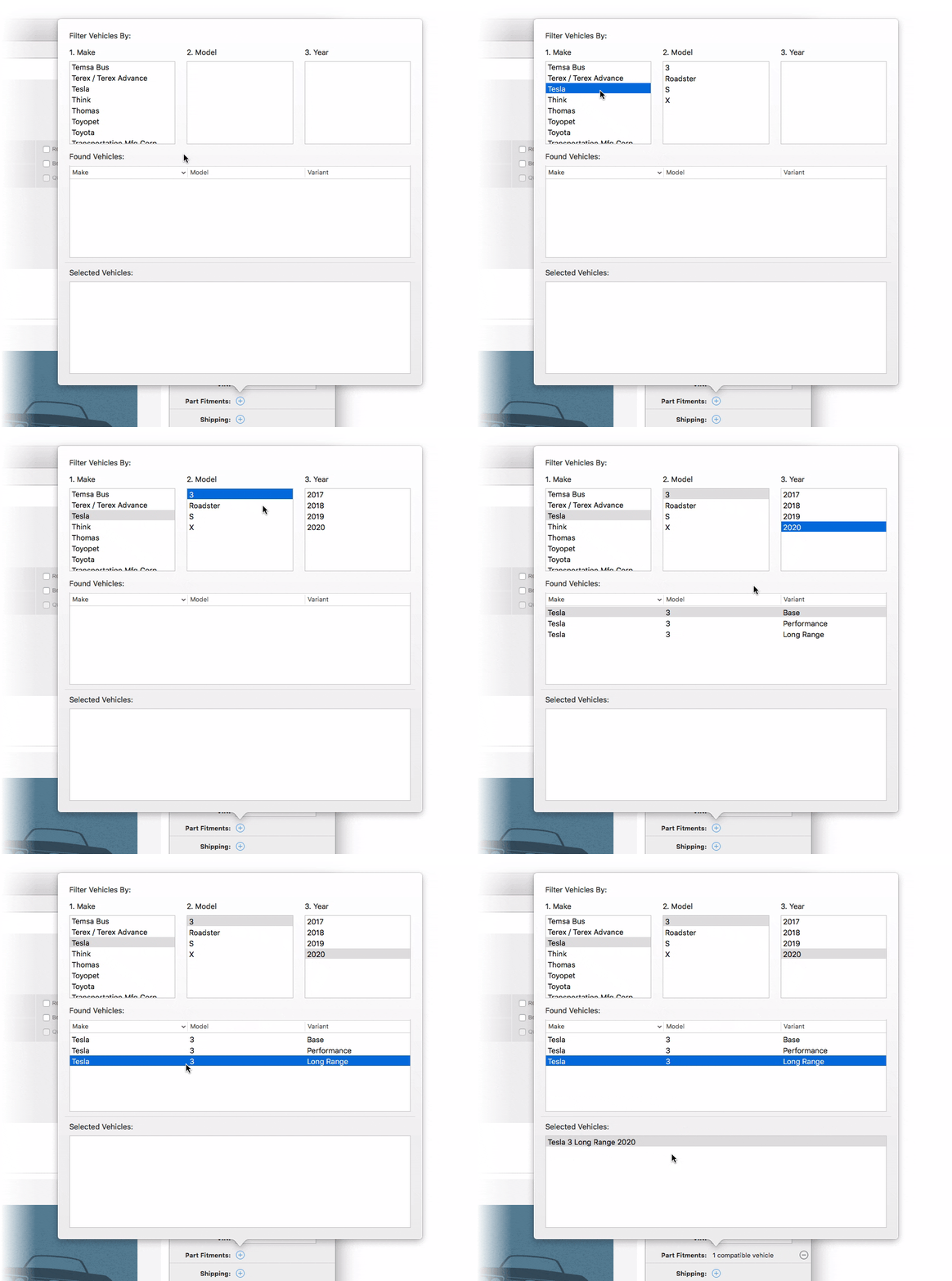
When listing vehicle parts, you can specify a list of compatible vehicles on eBay USA Motors, eBay Germany, eBay Australia and eBay UK. Make sure the category you selected supports parts compatibility.Multiple found vehicles can be selected by holding the shift key, and added by double-clicking.
CSV Import & Export
GarageSale can import listings from files in arbitrary CSV and TSV formats. You can specify what column in your CSV file is mapped to what listing or inventory field in GarageSale.Instead of importing new items from CSV you can also instruct GarageSale to just update existing listings from the data in the CSV file based on the SKU.
Export to CSV is supported for listings and orders.

Packing Slips and Invoices
Print packing slips that you can add to the shipment or use them to help you finding the ordered items in your warehouse. You have a label printer? Simply print the buyer's address using the address label template (29mm). If you're familiar to HTML you can create your own labels, too.Create invoices by sending the data from your orders to the GrandTotal invoice application.

Inventory
You can define inventory products and assign them title, pricing information, images, quantity, SKU and barcode (EAN/UPC).You can link your listing or a variation from a variation-enabled listing with your product through the SKU field. Every time an item sells, GarageSale will decrease the remaining quantity for the linked product.
Did you already know?: You can easily create a new listing from an inventory item through the "More" button in the Inventory section. Item quantity, item cost, price, title and description are copied into the listing.

Orders
GarageSale's Orders sections keeps tracks of incoming orders. It shows information about the order status, purchased items and provides you with all buyer details that you need to process the order and to ship your items.If needed you can communicate with your buyers by sending an eBay message. Once the item is shipped, upload the tracking ID to eBay and leave feedback right from within GarageSale.

Reports
It's crucial to your business success to keep track of your eBay income and expenses. Use the Report Generator to stay in control of your business.It lets you create custom reports showing the data you are interested in, including PayPal and eBay fees, for any given date range. Reports can generate diagrams or text tables and you can export your data to a CSV file.

Account Overview
All your important account information at a glance. View all your eBay messages and reply to customer requests.
Scheduled Starts
GarageSale supports eBay's own (paid) scheduler option but also offers its own graphical scheduler. The built-in scheduler can start one or more listings at the given time (GarageSale has to be running). It can be used at no cost.
eBay Stores
GarageSale fully supports eBay stores. Just download your store categories in the "Accounts" preferences panel and you're ready to go.If you want to create listings which contain a list of your store categories, pick one of GarageSale's so-called Pro Designs, e.g. "Pro: Top Seller". This way you can promote your store and make your viewers to have a look at your other store items.

Variations
GarageSale supports eBay's variation feature. You can list several variations of your items, for instance shoes in different sizes or t-shirts in different colors, in a single listing.The variation feature integrates with GarageSale's inventory tracking function.

Optimized Performance
GarageSale can handle even large databases with thousands of items. Searching, evaluating of smart groups, generation of reports and processing data from eBay is faster than ever.Batch Editing
Controls in Inspector apply to all selected items: Changing any control in GarageSale's inspector changes that value (e.g. duration, starting price, shipping info) for all selected listings, making batch changes to your listings a lot easier.In addition you can copy specific settings from one listing and paste them into other listings. Simply right-click on a listing in the sidebar and select "Copy Listing Components"/"Paste Listing Components".

Bulk Find and Replace
GarageSale comes with a powerful search and replace function that works on the entire database or the current selection. Easily edit title, description and other fields of all your listings in one go. (You find this new feature in the Edit menu.)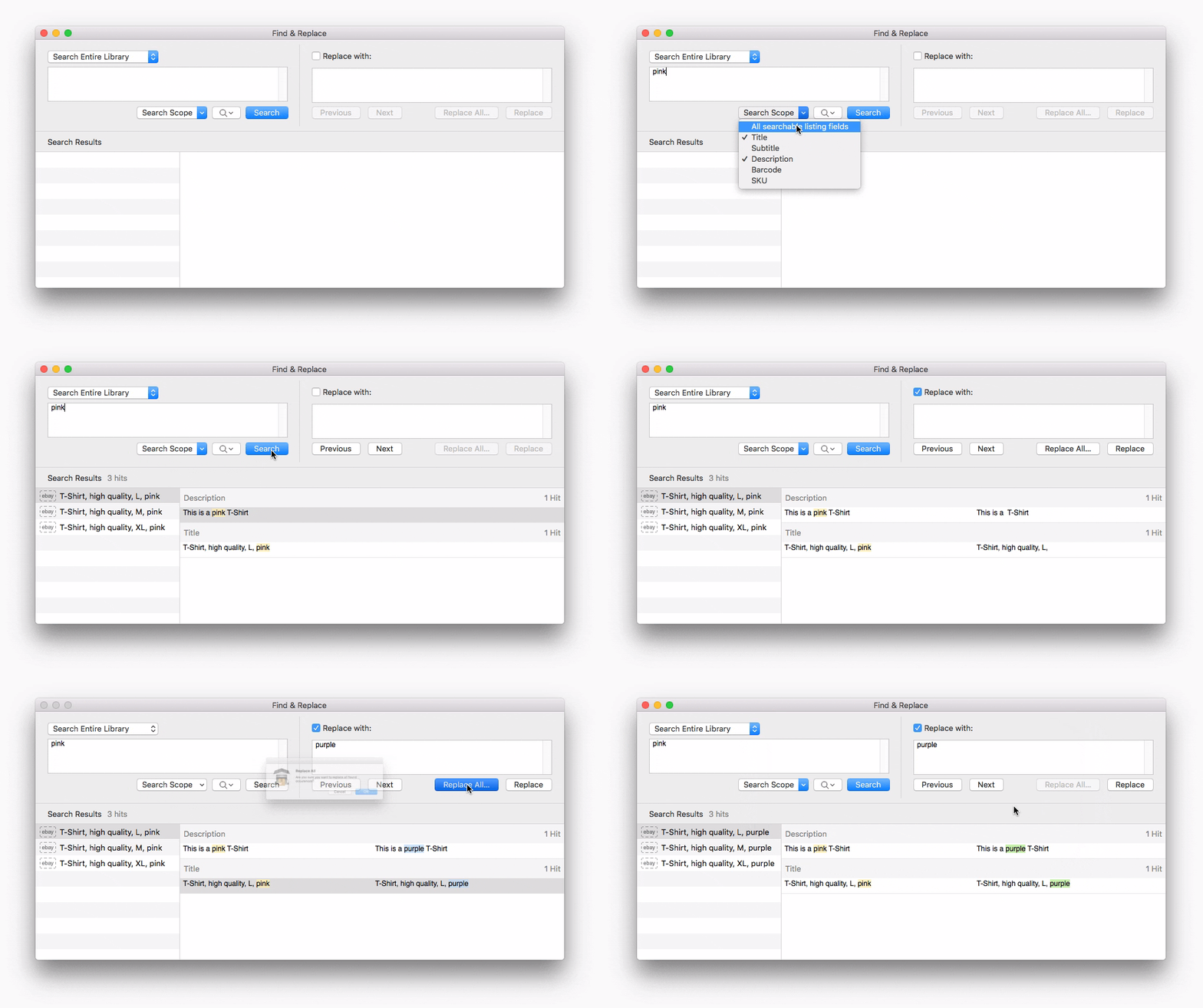
Dark Mode
GarageSale supports the Dark Mode appearance on macOS 10.14 Mojave and higher.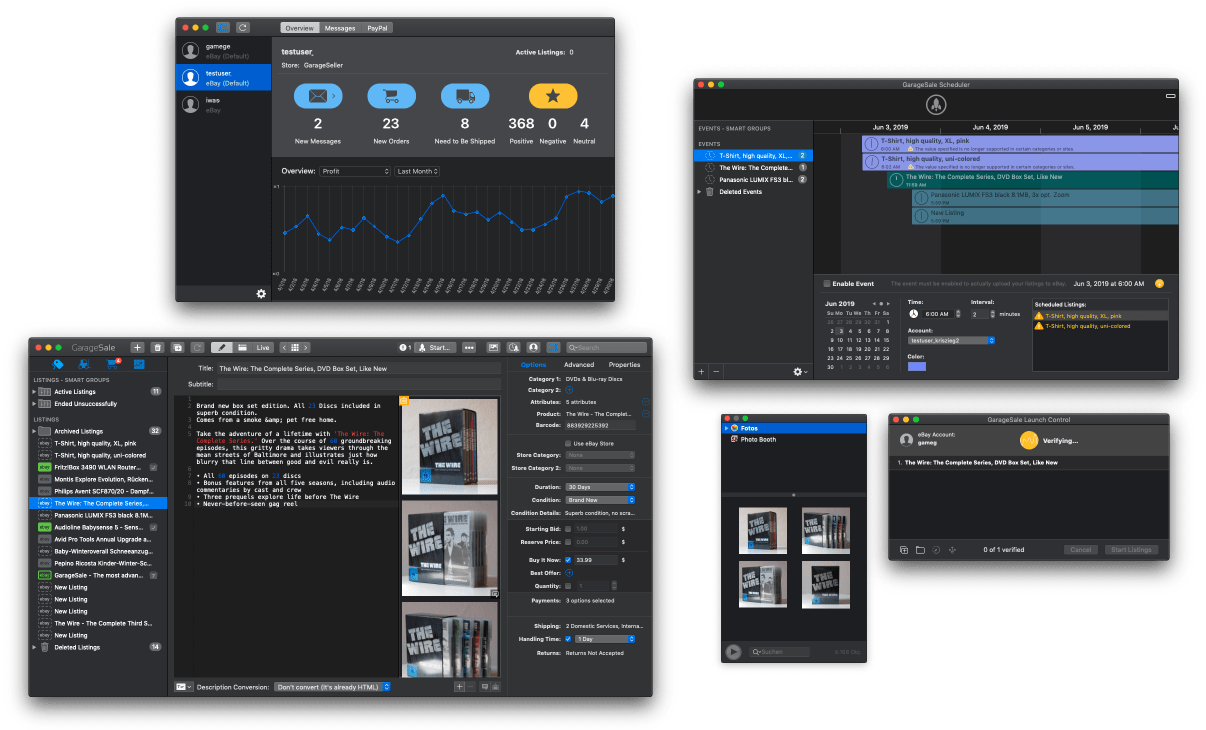
SKU Generator
The new SKU generator function for listings and inventory objects allows you to generate SKUs for multiple selected items in bulk. Just right-click on a group or a selection of items and select the Generate SKUs command.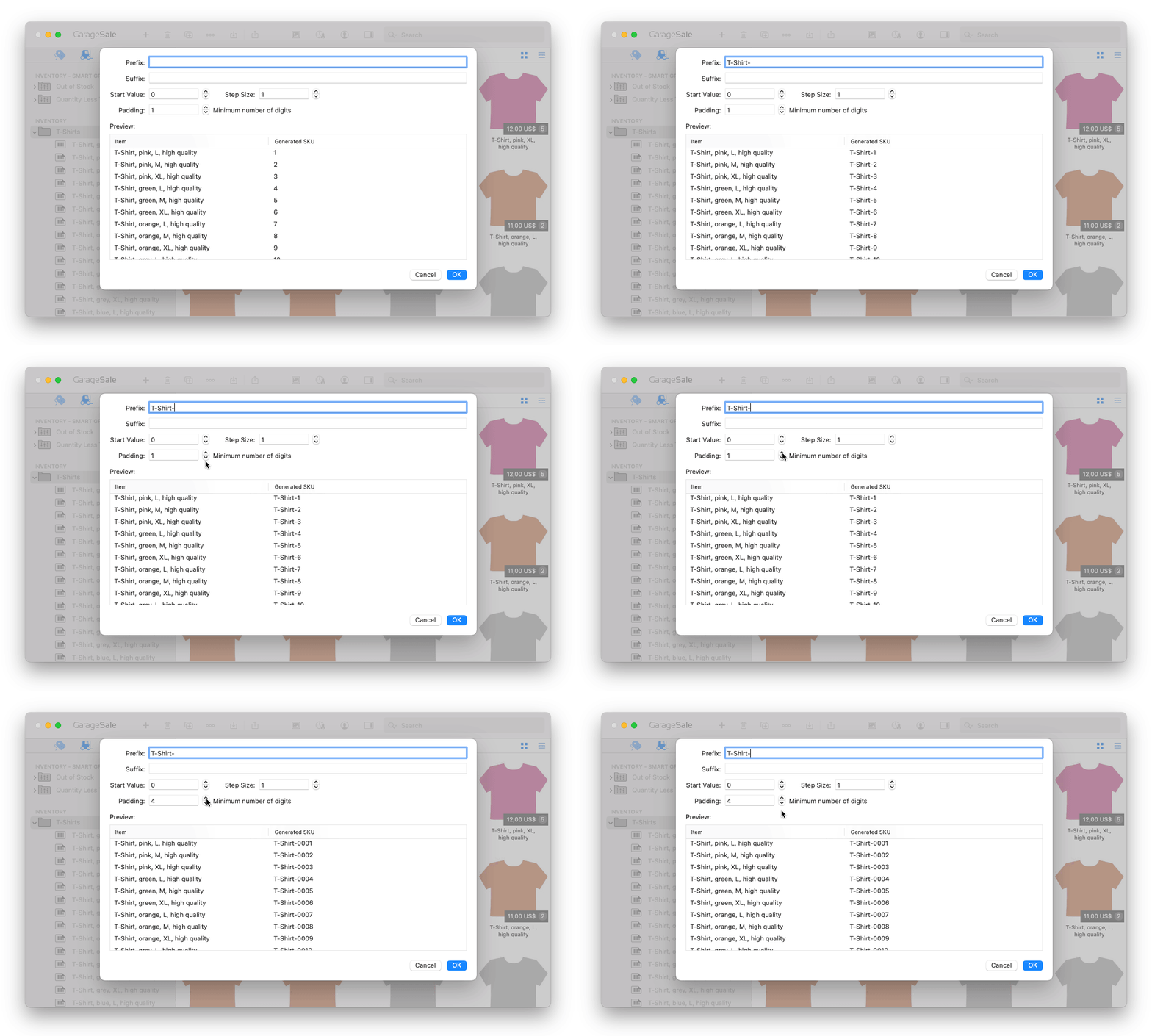
User Properties
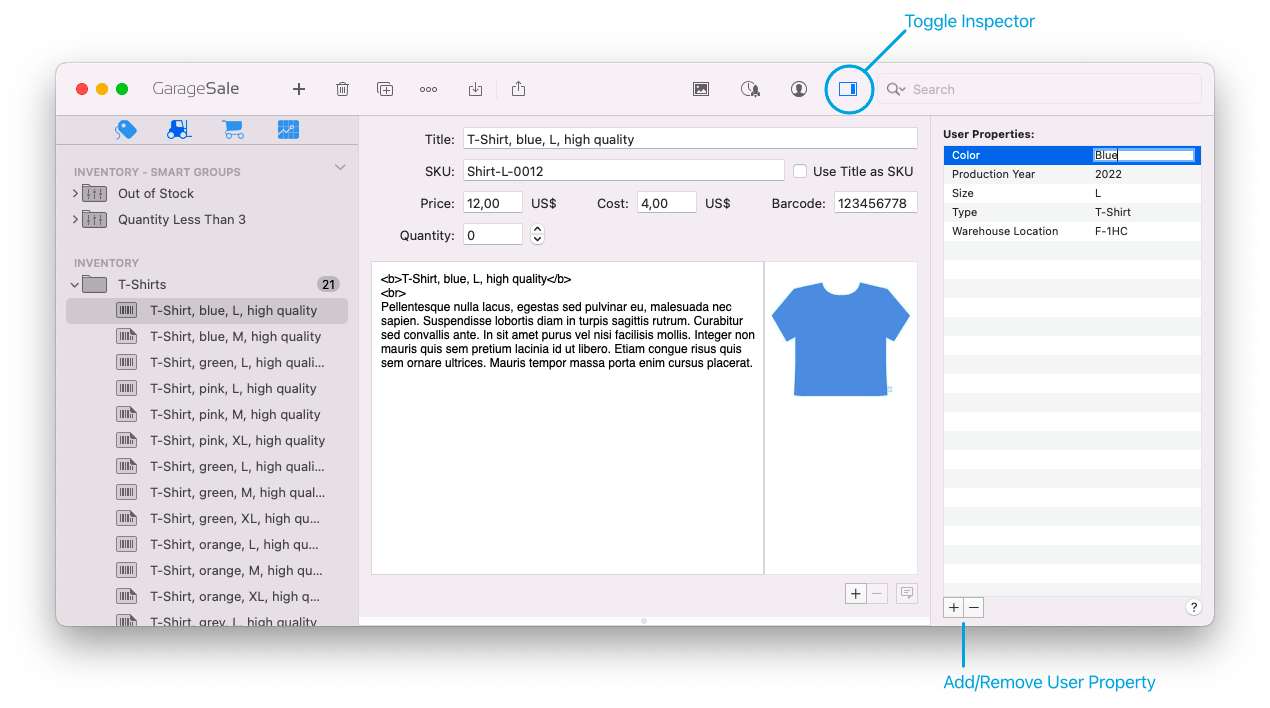
"User Properties" are a great way to store values associated with your items. You can use them for listings and for inventory items.These user properties will be carried over to the listings you link the inventory item with. Also, when you change a user property in an inventory item, the change is reflected in all listings linked to that inventory item.
In Listing mode User Properties are searchable and can be used in smart groups.
More details in the manual:
User Properties for listings | User Properties for inventory items
Instant Error Reporting
Whenever GarageSale detects a problem or receives an error from the eBay system, the affected option will be marked in GarageSale's Inspector and Preview mode. This way you get instant feedback what needs to be done. Click on the error icon in the Inspector sidebar to show the error description.In addition GarageSale offers local live validation of most eBay errors in new "Preflight" panel for one or multiple selected listings.

Take Photos with your iPhone
On macOS 10.14 Mojave and higher GarageSale supports the "Continuity Camera" feature: Use your iPhone or iPad to take a picture of your product and it appears instantly as a new image in your GarageSale listing.
iPhone Barcode Scanner
Use your iPhone as a barcode scanner! With our free helper app "GarageSale Scout" for iOS you can prepare listings and edit the title, add images and scan barcodes! You can then import them with GarageSale on your Mac and refine them further. Very helpful if you have a bunch of items you need to prepare for listing.

Detachable Popover Windows
You can "detach" a popup from its original position and move it to a permanent location on your screen. Great for preventing it from auto-closing while switching to another app or for working on multiple listings at the same time.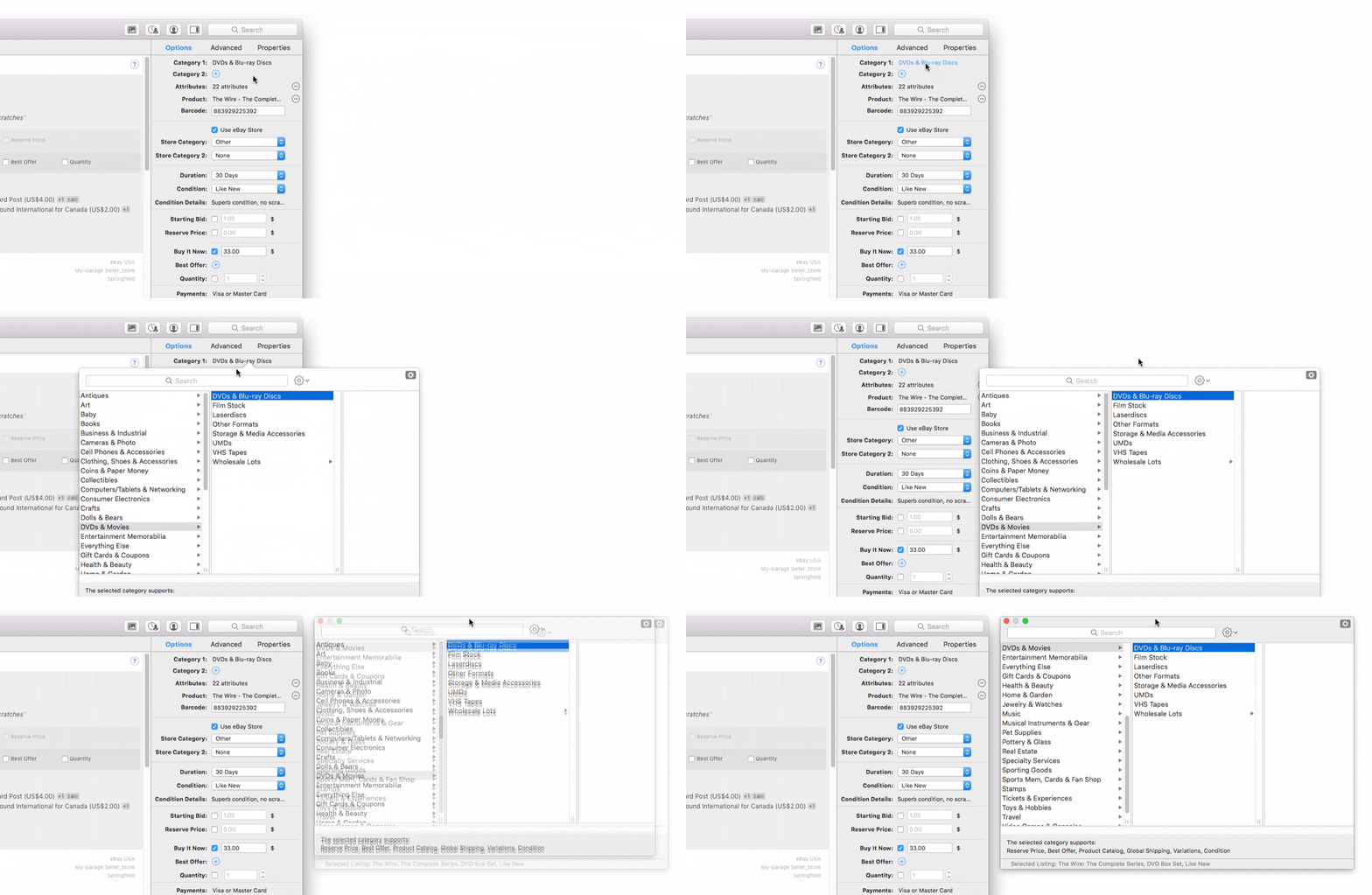
FTP and WebDAV Image Serving
Let GarageSale upload as many images as you like to your web server via FTP or WebDAV without paying image hosting fees to eBay. While GarageSale allows you to use its Free Image Hosting service or eBay's Picture Service (EPS) for storing your listing images, it can also upload your images to your own webserver. GarageSale will automatically scale your images to the selected size before it uploads them.
Multi-Account Support
GarageSale supports an unlimited number of eBay accounts. Business and private accounts are fully supported. Each account can be linked to a different PayPal account.Smart Groups
Create intelligent folders (smart groups) which sort your items by your very own criteria.Certified by eBay
GarageSale is officially certified by eBay for listing on their online marketplace. GarageSale uses eBay's newest and most flexible programming interfaces to stay compatible with everything that eBay has to offer.Message Templates
GarageSale allows you to send messages to your buyers using message templates, which can be customized to meet your personal needs. Go to the "Windows" menu and select "Show Message Templates".Text Snippets
In GarageSale you can create re-usable text snippets in the "Text Snippet Manager" (Window menu). This way you don't have to re-type the same text again and again.Advanced Import Function
GarageSale can import your older GarageSale files, XML files and Delicious Library items. Also, you can import your active and ended listings from the eBay website!Product Cataloque
List your items with less hassle and let eBay add information from their product cataloque to your listings.Photo Browser
You can browse your media library and add images to GarageSale.Active Content Compliant
GarageSale is compatible with eBay's listing policies: No active content, no non-secure HTTP content, mobile-friendly designs.Pricing:
US$ 14.99 (Monthly Subscription)US$ 39.99 (Single User License)
US$ 65.99 (Family License)
eBay Account Requirements:
Due to eBay policies your account must be older than 90 days and have at least 10 feedback points as a seller.Supported Marketplaces:
eBay (20 countries)
- eBay USA
- eBay Motors (USA)
- eBay Germany
- eBay UK
- eBay Australia
- eBay Italy
- eBay France
- eBay Austria
- eBay Canada
- eBay Switzerland
- eBay Ireland
- eBay Spain
- eBay Netherlands
- eBay Belgium (FR)
- eBay Belgium (NL)
- eBay Singapore
- eBay Philippines
- eBay India
- eBay Hong Kong
- eBay Poland
This is the number of all currently running eBay listings, created with GarageSale. This makes it the most popular eBay tool for Mac!See listings created with GarageSale
