





GarageSale Touch
Your mobile eBay app for iOS

Frequently Asked Questions
- Installation & Setup:
- How do I install GarageSale on my iOS device? Unfortunately, GarageSale Touch is no longer available.
-
I get a message saying that I am accessing eBay via a new device, and I need to verify the account by either phone or email?
This is a security function from eBay.
Access the 'My eBay' website on your computer. There is a page where you can set a security question in your account details. Once you have set your security question, you should be able to complete the Auth & Auth process on your iPhone. - Why do I have to fetch a 'token' at the eBay site? GarageSale is a certified eBay client. The only way for certified clients to add listings for your eBay account is via an access token. On the page you are granting GarageSale this eBay token.
- Usage & Settings:
- How do I reset my GarageSale password?If you no longer remember your password you have to delete your eBay account in the GarageSale preferences and re-add it afterwards.
-
How does the sharing feature work?The sharing feature allows you import auctions created on your iPhone or iPad into the Mac version of GarageSale 6. (Make sure you are in the same network (WLAN) while doing this.)
Please note that the sharing feature is not compatible with the new GarageSale 7 for Mac, only with the older version GarageSale 6.
1. Open up GarageSale on your iPhone and go to Preferences > 'Share with GarageSale'.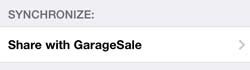
2. Then open up GarageSale on your Mac and if you have enabled the sharing feature in the GarageSale preferences you should see your device in the sharing section on the left:
3. Select the device and enter the passcode that you see on your iPhone. Finally you will have access to your auctions on the device. Select the auction you want to import and click on the 'import' button in GarageSale's bottom toolbar on the right side:
- How do I switch to another eBay Site?You can change the eBay Site in the GarageSale preferences.
- I get an error concerning my "Authorization Token". What now?eBay tokens expire automatically after a period of time. Simply refresh it in the GarageSale preferences.
- How many eBay accounts can I use with GarageSale?Right now GarageSale for iPhone and iPad allows one eBay account to be used at a time.
- 'The item cannot be listed or modified. The title and/or description may contain improper words, or the listing or seller may be in violation of eBay policy.' Error 240Please check our eBay error 240 help page.
- Miscellaneous:
- Do I need the full version of GarageSale for Mac?No, you can use GarageSale Touch as a standalone application.
- Do I have to give you access to my eBay account? No, you don't give us access to your account at all! eBays authorization page is a little bit misleading on that. When you agree to the eBay page, you give GarageSale access to your eBay account in form of an access token. This access token is not shared with anybody, including us.
- What information will GarageSale share with you? GarageSale won't share any kind of information about your eBay auctions or eBay activies with us. eBays sign-in page is designed also for web based eBay tools, where your token would be transmitted to the tool provider. Using that token a tool provider could manage your account for you and access your eBay information. GarageSale does not share your token with us, so none of your eBay information is shared.
System Requirements:
iPhone or iPad with iOS 12.0 and laterPricing:
$ 7.99Currency depends on your location
eBay Account Requirements:
Due to eBay policies your account must be older than 90 days and have at least 10 feedback points as a seller.Supported Marketplaces:
eBay (20 countries)
- eBay USA
- eBay Motors (USA)
- eBay Germany
- eBay UK
- eBay Australia
- eBay Italy
- eBay France
- eBay Austria
- eBay Canada
- eBay Switzerland
- eBay Ireland
- eBay Spain
- eBay Netherlands
- eBay Belgium (FR)
- eBay Belgium (NL)
- eBay Singapore
- eBay Philippines
- eBay India
- eBay Hong Kong
- eBay Poland

